
はじめに
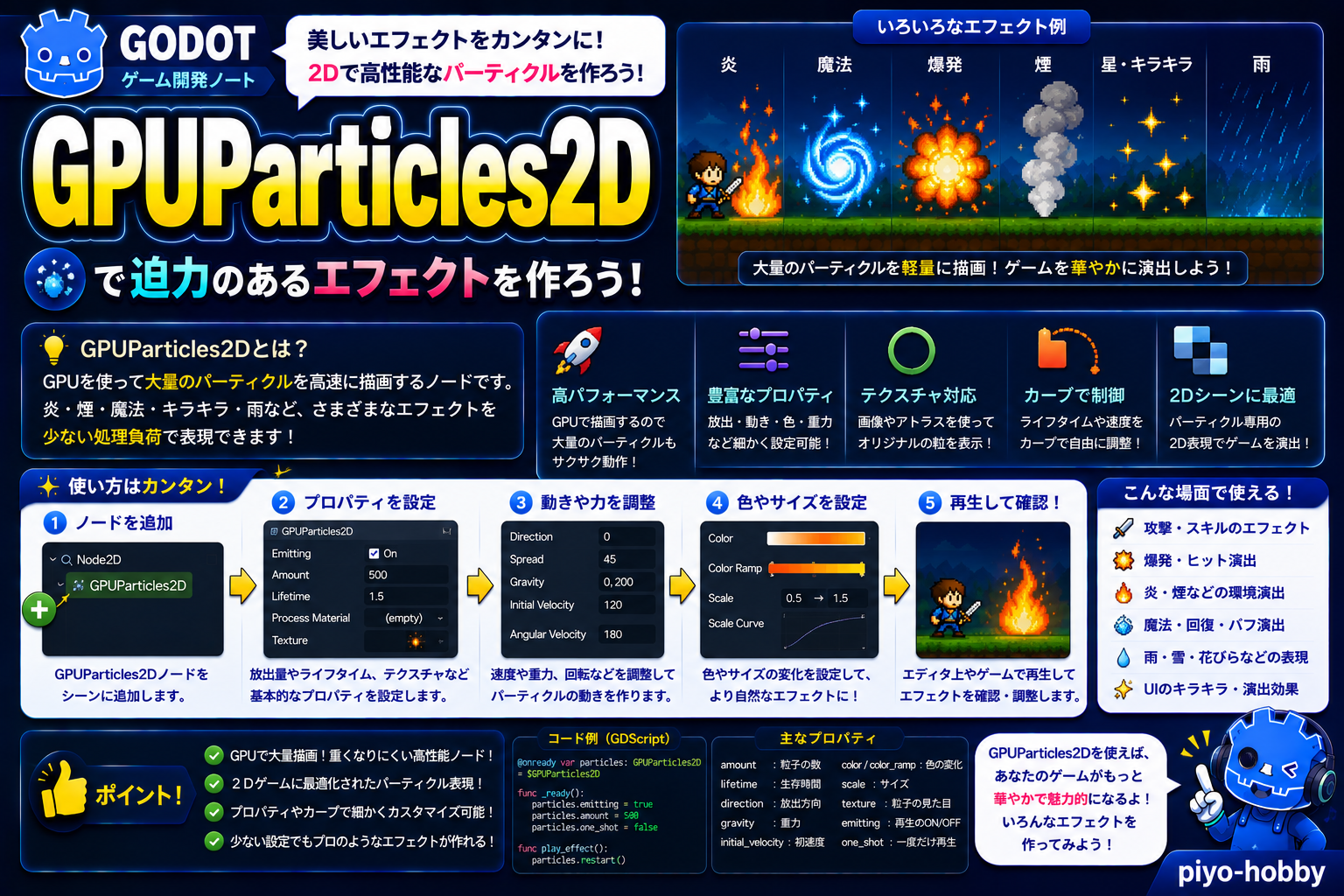
ゲームの「派手な瞬間」—爆発、炎、魔法、雨、雪—を表現するために欠かせないのがパーティクルエフェクトです。数百〜数千の小さな粒子を同時に動かす処理は、通常のアニメーションでは重く、フレームレートが落ちてしまいます。そこで登場するのが GPUParticles2D—グラフィックスカード(GPU)の力を使って高速処理するパーティクルノードです。
この記事では、GPUParticles2Dの基本設定から、ParticleProcessMaterialを使ったカスタマイズ、CPUParticles2Dとの使い分けまで、実践的な解説をお届けします。
GPUParticles2Dとは?
GPUParticles2D は、GPU(グラフィックスカード)を使って2Dパーティクルを高速処理するノードです。CPUではなくGPUで計算するため、数千個のパーティクルでも高いフレームレートを維持できます。
例えるなら、懐中電灯の光源。1つの粒子(光の点)が小さく、数千個集まると壮大な光の流れになる—それがパーティクルです。
継承ツリー:
GPUParticles2D → Node2D → Node → Objectこのノードを使うべき場面
使うべき場面
- 爆発エフェクト:敵撃破時の爆発、プレイヤーのダメージ表現
- 炎・火のエフェクト:キャンプファイア、ダメージゾーン、魔法攻撃
- 天候表現:雨、雪、あられなどの環境エフェクト
- 魔法・エネルギーエフェクト:魔法の軌跡、スキル発動時の視覚効果
- その他の演出:星、ホタル、スパークなど
使わない場面
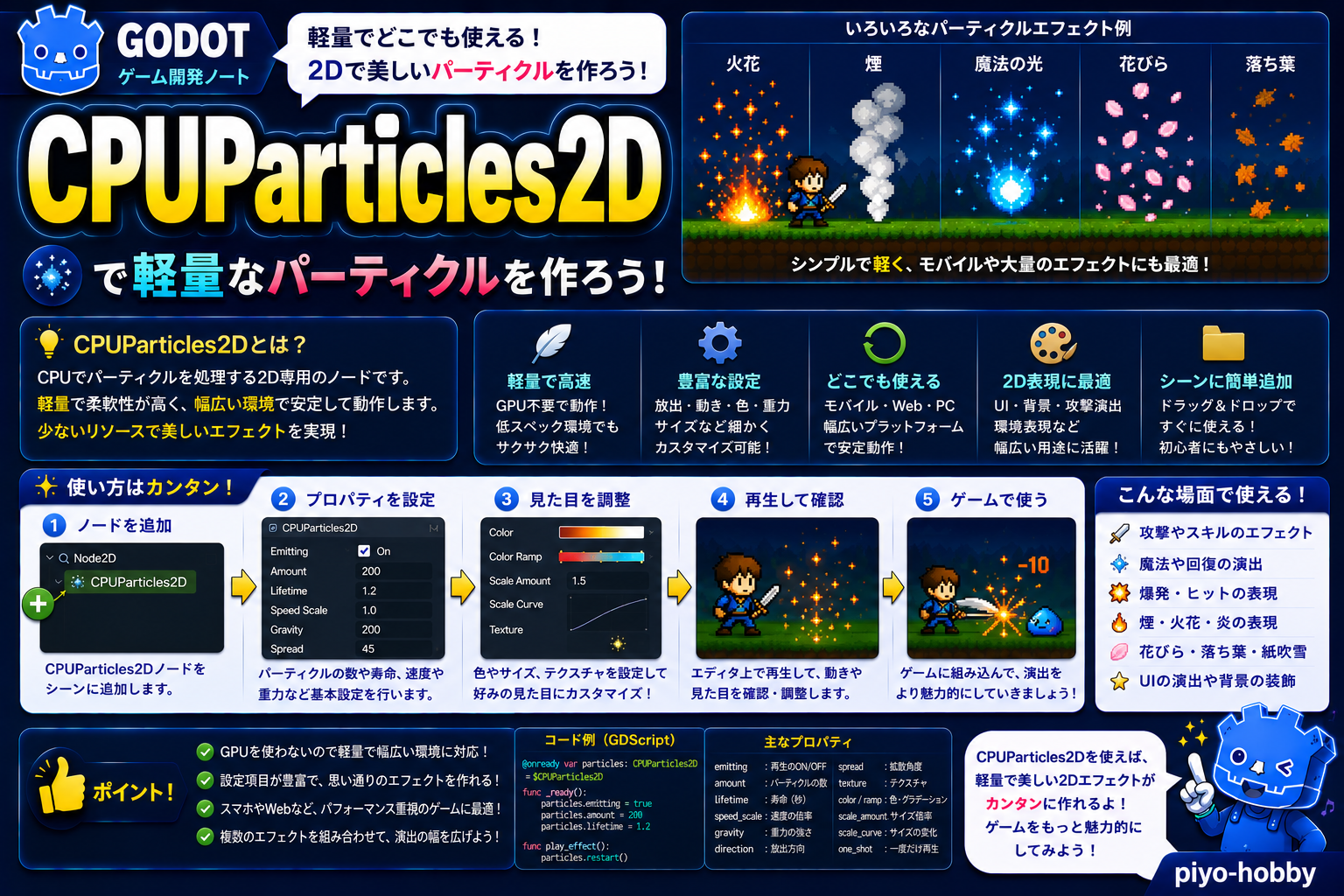
- モバイル・ローエンド環境:GPU処理が重い場合はCPUParticles2Dを検討
- WebGL対応が必須な場合:GPUサポートに不安がある場合はCPUParticles2Dの方が安全
主なプロパティと機能
| プロパティ | 型 | 説明 |
|---|---|---|
emitting | bool | パーティクル放射中かどうか。trueで粒子を放出開始 |
amount | int | 一度に作成できるパーティクル数の上限(多いほど重い) |
lifetime | float | 1つのパーティクルが存続する時間(秒) |
process_material | ParticleProcessMaterial | パーティクルの動き、速度、色などを制御するマテリアル |
texture | Texture2D | 各パーティクルに使用するテクスチャ画像 |
one_shot | bool | true=一度だけ放射して終了、false=emittingがtrueの間ずっと放射 |
explosiveness | float | 0〜1。高いほど粒子が一気に放出される(爆発的) |
randomness | float | パーティクル放出のランダム性(lifetimeのばらつき) |
基本的な使用例1:爆発エフェクト
extends Node2D

@onready var explosion = $GPUParticles2D

func _ready():
    # 爆発の初期設定
    explosion.amount = 100
    explosion.lifetime = 2.0
    explosion.one_shot = true
    explosion.explosiveness = 0.8  # 爆発的な放出
    explosion.emitting = false

func trigger_explosion():
    explosion.global_position = global_position
    explosion.emitting = true
    explosion.restart()  # パーティクルをリセットして再開始
カスタムParticleProcessMaterial例2:上昇する炎
extends Node2D

func _ready():
    var particles = $GPUParticles2D
    var material = ParticleProcessMaterial.new()

    # 基本設定
    material.direction = Vector3(0, -1, 0)  # 上向き
    material.spread_degrees = 45.0  # 45度の広がり角
    material.initial_velocity_min = 100
    material.initial_velocity_max = 200
    material.gravity = Vector3(0, -100, 0)  # 重力(下向きに加速)

    # 色の時間変化
    var color_gradient = Gradient.new()
    color_gradient.add_point(0.0, Color.YELLOW)
    color_gradient.add_point(0.5, Color.ORANGE)
    color_gradient.add_point(1.0, Color(1, 0, 0, 0))  # 赤 → 透明
    material.color_ramp = color_gradient

    # サイズの時間変化
    var scale_curve = Curve.new()
    scale_curve.add_point(Vector2(0.0, 1.0))
    scale_curve.add_point(Vector2(1.0, 0.0))  # 消えるにつれて小さく
    material.scale_curve = scale_curve

    particles.process_material = material
    particles.emitting = true

もっと使いこなす:ParticleProcessMaterialのカスタマイズ
| パラメータ | 型 | 説明 |
|---|---|---|
direction | Vector3 | 粒子の発射方向(例:(0,-1,0)は上向き) |
spread_degrees | float | 中心からの広がる角度(0=一直線、180=全方向) |
initial_velocity_min / max | float | 粒子の初速のランダム範囲 |
gravity | Vector3 | 重力方向と大きさ(例:(0,-980,0)は現実的な落下) |
color_ramp | Gradient | 粒子の色を時間経過で変化させるグラデーション |
scale_curve | Curve | 粒子のサイズを時間経過で変化させるカーブ |
tangential_accel_min / max | float | 接線方向の加速度(渦巻き効果) |
anim_speed_min / max | float | アニメーション速度(スプライトシートの場合) |

GPUParticles2D vs CPUParticles2D
| 項目 | GPUParticles2D | CPUParticles2D |
|---|---|---|
| 処理速度 | 高速(GPU処理) | 低速(CPU処理) |
| 大量パーティクル | 数千個まで快適 | 数百個が限界 |
| モバイル対応 | 注意(GPU不足時は落ちる) | 安全 |
| WebGL対応 | 完全サポート | より安全 |
| 推奨用途 | PC・高性能ゲーム | モバイル・軽量ゲーム |
まとめ
GPUParticles2D は、PC向け高性能ゲームの視覚効果を担う重要なノードです。ParticleProcessMaterial を使いこなせば、爆発から雨まで、あらゆる演出を実現できます。
- GPU高速処理:数千個のパーティクルをフレームレート維持で動作させる
- ParticleProcessMaterialの柔軟性:direction、gravity、color_ramp など豊富なパラメータでカスタマイズ
- one_shot と emitting の使い分け:一度だけの爆発か継続放出か、シーンに合わせて選択
次回は「CPUParticles2D」をお届けします。モバイルやローエンド環境でも安定動作するパーティクルシステムの実装方法を解説します!
関連性の高いノード解説記事
- Node2D
- Sprite2D
- CollisionShape2D
- CharacterBody2D
- RigidBody2D
- Area2D
- Control
- Button
- Label
- TextEdit
- ItemList
- TabContainer
- Timer
- Tween
- Camera2D
- ParallaxBackground
- TileMap(旧)
- Path2D
- PathFollow2D
- RemoteTransform2D
- Marker2D
- Node
- VisibleOnScreenNotifier2D
- RayCast2D
- ShapeCast2D
- PinJoint2D
- HingeJoint3D
- SliderJoint3D
- ConeTwistJoint3D
- Generic6DOFJoint3D
- Polygon2D
- ColorRect
- NinePatchRect
- TextureRect
- StaticBody2D
- TileMapLayer
- AnimationPlayer
- AnimationTree
- AudioStreamPlayer
- AudioStreamPlayer2D
- GPUParticles2D
- CPUParticles2D
- Line2D
- CanvasLayer
この記事はGodot 4.xをもとに執筆しています。

コメント